Cueport is a local-first music player for people who own their music.
Cueport
Cueport is local-first
The desktop and phone pair directly on a local network or hotspot. The QR code carries connection details; data moves both ways after pairing.
Desktop appcanonical library
LAN or hotspot
scan QR to pair
Phone appselected replica
→Desktop to phoneselected crates, tracks, analysis, cues
←Phone to desktopedits return for desktop review
Cueport
Cueport v1 workflow
Cueport v1 uses Serato as the source of truth. The desktop database imports audio and metadata from Serato. The mobile database is a cached replica.
Serato librarysource of truth
Desktop SQLitecanonical working copy
Mobile SQLitecached replica
→Import from Seratolibrary metadata and existing analysis
→Sync to mobileselected library copy
←Mobile edits returnreviewed on desktop before publishing
←Write back to Seratorestore point first, then approved library update
One desktop review queuedesktop edits enter directly; synced edits join the same queue
The gap
Problem: DJ tool dependence
DJ tools offer tempo, key, and beat analysis for DJ workflows. Mainstream tools need their own analysis layer.
Tempo, key, and beat grids exist inside DJ tools
Those systems are designed for DJ workflows
Mainstream tools need their own analysis layer
trail mix
Solution: trail mix
trail mix accepts an audio file and returns tempo, key, beat positions, and waveform data as versioned JSON.
Decode and normalization
Audio files become a mono sample buffer along with its sample rate
Decoding: an audio file becomes evenly spaced amplitude values
Downmixing: sample buffers combine into one mono signal
f32: a 32-bit floating-point number for storing those amplitudes
u32: a non-negative 32-bit integer for storing the sample rate
Input file
MP3 · FLAC · WAV · AIFF · MP4
→
Decode to samples
left/right sample buffers
→
Downmix
(left + right) / 2= one mono buffer
→
Analyzer input
samples: &[f32]sample_rate: u32
Design
Why Rust for trail mix
trail mix is a Rust library because Cueport is a Rust app and the analysis has to run on-device with the same result every time.
Same language as Cueport
Cueport calls trail mix like any Rust crate, with no cross-language glue code to write or maintain.
No separate runtime
Compiles into Cueport's binary. Unlike Python or Java, no interpreter or garbage collector ships with it.
Memory-safe decoding
Unlike C or C++, a malformed audio file can't corrupt memory or open a security hole.
Native DSP performance
Compiles to native machine code, so the analyzers' heavy per-sample math runs fast.
Design
Why we built our own
The existing libraries in this space are solid, but no single one gave us a permissive, in-process API that also detects mid-track tempo and key changes and emits a versioned format.
Option
Language / API
License
Benchmark baseline
Why not used
stratum-dsp
Rust
MIT OR Apache-2.0
Yes
We should reach out about collaboration
S-KEY
Python
MIT
Yes
Needs a model runtime
libKeyFinder
C++
GPL-3.0
Yes
License
Essentia
C++ and Python
AGPLv3 or paid
Yes
License
Vocabulary
MIR vocabulary
Four helpful terms relevant to trail mix.
Onset
The start of a sound event. Where energy jumps as a drum hits or a note begins. Onsets are evidence for beats, not beats themselves.
Tempo
The rate of the counted beat, in BPM. It also sets the expected time between beats. 120 BPM = two beats per second = 0.5 seconds per beat.
Chroma
A pitch class is a note category such as C, C#, or D. Chroma is a bar chart of how much the song uses each of the 12 pitch classes.
Key
There are 24 keys (12 major, 12 minor). To find it, compare the track's chroma to a template for each of the 24 keys and pick the closest match. E.g. A minor
Analyzer 1 of 3
Beat Salad
Tempo and beat positions
Onset detection
An onset is where a new sound starts, like a drum hit. It shows up as a sudden jump in energy, so we track the energy frame by frame and add up only the rises. That running total is the onset-strength curve, and its peaks are the candidate beats.
Tempo estimation and beat tracking
Tempo estimation finds the beat period that best matches the repeating peaks in the onset-strength curve. To find a beat switch, the same estimator runs on rolling sections of the track.
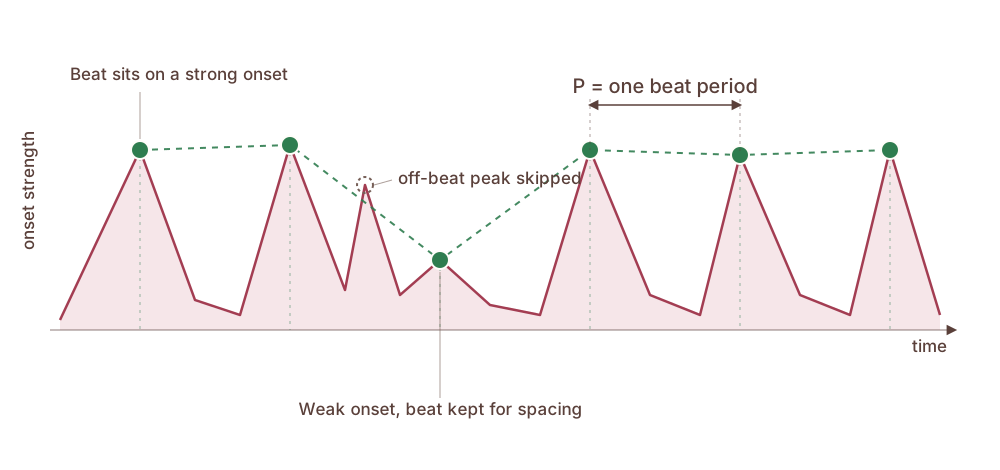
Beat tracking with dynamic programming (DP)
Beat tracking uses the estimated BPM to place the actual beat timestamps. Tempo estimation gives BPM, but it does not choose the beat grid offset, that is where those beats start. DP helps choose which grid is most plausible across the whole track. It can keep the sequence regular when one beat is weak or missing, and it can skip a loud off-beat onset.
Beat Salad pipeline
Samplesmono audio values
→
Onset detectionenergy rises
→
Tempo estimationperiodicity score
→
Beat trackingbeat timestamps
→
BeatAnalysisglobal_bpmbeatstempo_segments
Onset detection uses frequency-band energy to build the onset-strength curve.
Tempo estimation works on that curve over time. The interval histogram counts how often different time gaps occur between onset peaks. For example, if 0.5 s gets a high score, it supports 120 BPM. Autocorrelation checks which time shifts make the onset curve line up with itself.
Then beat tracking uses DP to choose the actual beat timestamps under that tempo.
Beat switches
A track can contain more than one meaningful tempo. Beat Salad reports the dominant BPM and the alternate tempo when the second section is long enough to matter.
Field
What it contains
Example
global_bpm
Dominant tempo for the whole file
120 BPM
multi_tempo
Boolean: another tempo covers at least 25%
true
alternate_bpm
Secondary tempo + coverage fraction
90 BPM, 45%
tempo_segments
Timeline of local BPM ranges
120 BPM, then 90 BPM
Threshold: alternate tempo must cover at least 25% of the track.
Multi-tempo
A beat switch
A 60-second demo: 120 BPM for the first half, then 90 BPM.
120 BPM0:00-0:30
90 BPM0:30-1:00
global_bpm120.08
multi_tempotrue
alternate_bpm90.03
switch detected~33 s
The values are Beat Salad's output; full JSON in the appendix.
Analyzer 2 of 3
Key Lime
Musical key from chroma
Key detection from chroma
Take the 12-note chroma and compare it to a template for each key. The closest match, across all 24 major and minor keys, is the detected key.
The formula: Pearson correlation; how closely the chroma matches a key template, after mean-centering and normalizing both
score(k): correlation for key k; the highest of 24 keys (12 major + 12 minor) wins
c_p: chroma energy at pitch class p (0-11, one per semitone)
T_{p,k}: expected energy for pitch class p in key template k (K-K, Temperley, EDMA, or an ML model)
Key changes
Key Lime reruns chroma-to-template scoring in rolling windows, groups adjacent windows with the same confident key, and reports an alternate key when it covers at least 25% of the track.
Field
What it contains
Example
key
Primary key for the whole file
A minor
multi_key
Boolean: another key covers at least 25%
true
alternate_key
Secondary key + coverage fraction
C major, 25% coverage
segments
Timeline of local key ranges
A minor, then C major
Multi-key
A key change
A 60-second demo: A major for the first half, then C minor.
A major0:00-0:30
C minor0:30-1:00
keyC minor
multi_keytrue
alternate_keyA major
change detected~33 s
The values are Key Lime's output; full JSON in the appendix.
Analyzer 3 of 3
Sampler Platter
Compact waveform overview
Sampler Platter
Waveform summarization
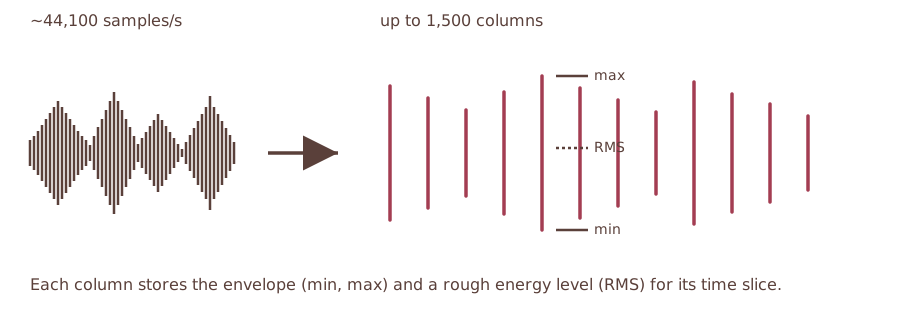
The min, max, and RMS columns that draw a track lane.
Waveform implementation
The samples are split into up to 1,500 equally sized buckets. Each bucket becomes one column, summarized by three values.
let slice = &samples[start..end];
let min = slice.iter().copied().fold(f32::INFINITY, f32::min);
let max = slice.iter().copied().fold(f32::NEG_INFINITY, f32::max);
let sum_sq: f32 = slice.iter().map(|s| s * s).sum();
let rms = (sum_sq / slice.len() as f32).sqrt();
slice: the samples in this bucket (track length / up to 1,500 buckets)
min: lowest sample value; bottom edge of the waveform bar
max: highest sample value; top edge of the waveform bar
rms: root mean square energy; renderers can draw it as the filled region inside the bar
Sampler Platter
App-style waveform sample
A 60-second segment from the Cueport demo audio, reduced to 200 fixed-width bars. Bar height uses max(|min|, |max|); color follows RMS.
segment60 s
bars200
heightmax(|min|, |max|)
colorRMS
Evaluation metrics
How to read the accuracy numbers on the next slide.
MIREX weighted score (key)
A wrong key is often musically close, so each track earns partial credit rather than pass or fail: an exact match scores 1.0, a perfect fifth 0.5, a relative major or minor 0.3, a parallel major or minor 0.2, and anything else 0. MIREX is the average of that credit over all tracks.
F1 at 70 ms (beats)
A predicted beat counts as correct when it lands within 70 ms of a real beat. From those matches, precision is the fraction of predicted beats that are correct and recall is the fraction of real beats found. F1 is the harmonic mean of the two, so it is high only when both are high: \(F_1 = \dfrac{2\,\times\,\text{precision}\,\times\,\text{recall}}{\text{precision}\,+\,\text{recall}}\), on a 0 to 1 scale.
Accuracy1 and Accuracy2 (tempo)
Accuracy1 counts a BPM as correct within four percent of the label. Accuracy2 also counts half-time or double-time as correct, because 70 and 140 BPM are the same pulse counted differently.
Hold out vs development
A development corpus is one we looked at while tuning. A hold out corpus is sealed before the run and never used for tuning, so it gives the fair score.
Results and gaps
Tempo leads the hand-written DSP baselines and trails the ML models. Key is the weakest analyzer.
flux(t): onset strength at frame t; its peaks are the candidate beats
E_b(t): energy in band b at frame t, from 24 pitch-spaced Goertzel filters
max(0, ...): half-wave rectification, so only rising energy counts, not fading
sum over b: fold the rises across all 24 bands into one number per frame
Tempo estimation
Autocorrelation of the onset curve, together with an inter-onset interval histogram, locates the beat period. An octave prior then nudges the pick toward mid-range tempos to break the half and double time tie.
C(i): best cumulative score for a beat ending at frame i
O(i): onset strength at frame i
P: target beat interval, \(P = 60\,f / \mathrm{BPM}\) with onset frame rate f
Beat tracking inner loop
The forward pass in Rust: for each frame, keep the best predecessor, then add the frame's own onset strength.
// beat interval in onset frames, and how far it may drift
let period = 60.0 * envelope_rate / bpm;
let denom = 2.0 * (period * 0.5).powi(2);
// for a beat at frame i, try each earlier frame j before it
let deviation = (i - j) as f32 - period;
let penalty = (-(deviation * deviation) / denom).exp();
let path = previous_score + penalty * 0.5;
// keep the best predecessor, then add i's own onset strength
let score = onset[i] + best_path;
period: ideal beat interval in onset frames, from the estimated BPM
penalty: Gaussian weight for a predecessor, highest when the gap i - j is one period
path: that predecessor's cumulative score plus the weighted interval reward
score: frame i's onset strength plus the best predecessor path
Beat switch: full output
The complete beat object Beat Salad returned for the 120-to-90 BPM click track on the demo slide.