IEEE Lunch & Learn
trail mix: DSP analysis
with a compact transformer key reranker
trail mix: DSP analysis with a compact transformer key reranker
trail mix is a Rust toolkit for local tempo, beat, key, and waveform analysis of music files.
This version also covers the compact key reranker, which raises global-key accuracy while keeping the same local Rust analysis API.
Cueport
Cueport
Cueport is a multi-device workstation for DJs that can import Serato libraries or construct local libraries directly from audio files.
Cueport
Cueport starts from the way DJs already work. Music files and DJ metadata live on the gig laptop, and tools such as Serato are used both for live playback and set preparation.
That metadata includes crates, cue points, tags, notes, labels, tempo, key, and waveform data. Cueport lets DJs cache selected music and metadata on a phone so they can review and edit away from the laptop, including in places with weak internet such as a flight or a venue.
Serato-backed Cueport demo
Recorded walkthrough of Cueport using a Serato-backed library. This demo shows the original product loop: Cueport reads DJ metadata and analysis from the desktop library, gives the user a working copy, and keeps the reviewed writeback step on the desktop.
Cueport
Local pairing
The desktop and mobile applications exchange selected library data over a local network or hotspot after QR-based pairing.
Desktop app
canonical library
LAN or hotspot
scan QR to pair
Phone app
selected replica
→
Desktop to phone
selected crates, tracks, analysis, cues
←
Phone to desktop
edits return for desktop review
Local pairing
Cueport copies selected music and associated metadata from a laptop to a phone over a local connection. The usual path is LAN transfer on a private Wi-Fi network. On public Wi-Fi, where client isolation may block device-to-device traffic, the user can pair through a hotspot instead.
The QR code carries the connection details so the phone knows which desktop library to pair with.
Edits can be made on the phone while away from the laptop. When the devices pair again, mobile edits sync back to the desktop app for review.
Pairing is bidirectional: desktop data can move to the phone, and reviewed phone edits can move back to the desktop library.
Cueport
Serato integration
Cueport v1 reads tempo, key, cues, and beat-grid metadata from an existing Serato library on disk.
Serato library
source of truth
Desktop SQLite
canonical working copy
Mobile SQLite
cached replica
→
Import from Serato
library metadata and existing analysis
→
Sync to mobile
selected library copy
←
Mobile edits return
reviewed on desktop before publishing
←
Write back to Serato
restore point first, then approved library update
One desktop review queue
desktop edits enter directly; synced edits join the same queue
Serato integration
Cueport v1 uses Serato as the source of truth for music file analysis and DJ metadata. The desktop database is the canonical working copy, and the mobile database is a cached replica to work away from the laptop.
Desktop edits enter the review queue directly. Mobile edits sync back to desktop first, joining the same queue. Once approved the changes write back to Serato.
Cueport Direct
Cueport Direct
Cueport Direct constructs a working music library from local folders without depending on an external DJ database.
Pick one or more local music folders
Cueport builds a cueport-direct.db working library
Browse, prep, play, and edit without a Serato library
trail mix analyzes audio locally for BPM, key, beats, and waveforms
Cueport Direct
Serato is still the first full integration, but Cueport Direct gives the app a path for people who do not have a Serato library. The user chooses one or more music folders. Cueport scans them into cueport-direct.db, stores collections, cues, notes, colors, restore points, and analysis there, and skips the Serato review and writeback flow because there is no external DJ library to publish into.
That is the product reason trail mix exists. If Cueport Direct imports folders directly from disk, it cannot import tempo, key, beat, and waveform analysis from Serato. It has to generate those values from the audio files themselves, locally and reproducibly.
trail mix
trail mix
trail mix is a Rust toolkit that decodes audio into mono samples and runs three analyzers behind one versioned JSON output.
trail mix
An audio file first goes through the codec layer, which decodes (MP3, FLAC, WAV, AIFF, or MP4) into mono samples and a sample rate. The audio is now numbers: one amplitude value after another. Mono means the left and right channels have been combined into one signal, and the sample rate tells the analyzers how much time each sample represents.
trail mix has three analyzers behind one compact local output contract. Give the names one beat here: beat salad, key lime, and sampler platter. The names are memorable, but they also map cleanly to the architecture. beat salad estimates tempo, beat positions, and local tempo sections. key lime estimates musical key from chroma, first with DSP template scoring and then with a compact reranker for the global key. sampler platter summarizes the waveform for display with min, max, and RMS columns.
key lime shows the main technical argument cleanly: pure DSP gives an interpretable local estimator, and a small transformer helps only where the DSP evidence is ambiguous.
Signal input and normalization
Audio decoding normalizes supported file formats into a mono sample buffer and sample rate.
Decoding : an audio file becomes evenly spaced amplitude valuesDownmixing : sample buffers combine into one mono signalf32u32
→
Decode to samples
left/right sample buffers
→
Downmix
(left + right) / 2
= one mono buffer
→
Analyzer input
samples: &[f32]
sample_rate: u32
Signal input and normalization
Decoding turns an audio file such as MP3, FLAC, WAV, AIFF, or MP4 into evenly spaced amplitude values stored as sample buffers, usually one buffer for the left speaker and one buffer for the right speaker. The decoding layer then downmixes those buffers into one mono buffer. Downmixing combines the left and right samples at the same time position into one amplitude value, commonly by averaging them. After that step every format looks the same to the analyzers: samples and a sample rate. The core takes the buffer, not a file, so an app that already has playback samples can skip file decoding entirely.
trail mix
Why build a local analyzer?
Cueport Direct imports ordinary folders on a user's machine. Analysis has to run in process, finish during library import, produce reproducible metadata, and avoid requiring a server.
Option
License
Integration issue
stratum-dsp MIT OR Apache-2.0
closest Rust reference; reports global tempo and key, not the local sections Cueport needs
S-KEY MIT
accurate learned reference, but needs a model runtime rather than a small native Rust crate
libKeyFinder GPL-3.0
license does not fit a permissive app integration
Essentia AGPLv3 or paid
license cost and terms did not fit this product integration
Why build a local analyzer?
Cueport Direct imports ordinary folders on a user's machine. That means analysis has to run in process, finish during library import, produce reproducible metadata, and avoid requiring a server.
The existing tools are useful references, not mistakes to avoid. stratum-dsp is the closest Rust DSP reference, but it reports global tempo and key rather than the local sections Cueport needs. S-KEY is a strong learned reference, but it needs a model runtime. A model runtime means shipping an inference engine such as PyTorch or ONNX Runtime plus the model weights. That adds binary size, platform-specific packaging, and another dependency to validate. For Cueport, the preferred boundary is a small native Rust analyzer that runs inside the app process. libKeyFinder and Essentia both matter as baselines, but their license terms do not fit a permissive in-app integration here. The reason for trail mix is the combination of license fit, local Rust API, mid-track changes, and versioned output.
Tempo estimator
beat salad
Tempo and beat positions
beat salad
beat salad is the tempo and beat estimation crate. It estimates one global tempo, a confidence score, regular beat positions, and windowed tempo segments from mono samples.
It is the most complex of the three analyzers in the current implementation. Multi-tempo tracks such as mashups and medleys are handled by the windowing covered later, in the beat-switch section.
Onset detection
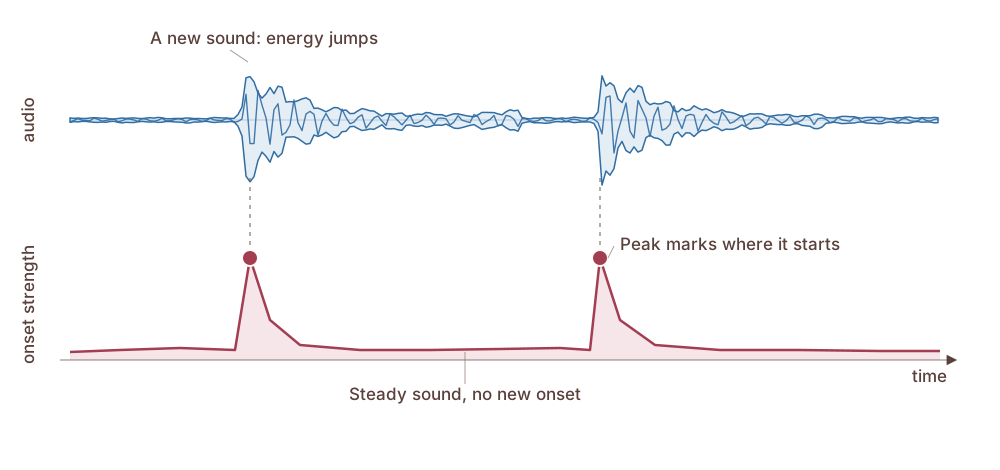
Onset detection measures frame-to-frame increases in band energy and uses peaks in the resulting onset-strength curve as beat candidates.
Onset detection
An onset is where a new sound starts, like a drum hit or a plucked string, and it shows up as a sudden jump in energy. The audio is cut into short frames, and each frame measures how much energy increased since the frame before. Only increases count, because a sound getting louder is evidence for a new event while a sound fading out is not. Adding those increases gives one number per frame, the onset strength, and the sequence of those numbers is the onset-strength curve in the picture. Its peaks are candidate beats for tempo estimation and beat tracking. The implementation reads energy across 24 frequency bands spaced like musical pitch using Goertzel filters, and the summed positive changes are called spectral flux.
Onset detection formula
Spectral flux turns band-energy rises into one onset-strength value per frame.
\[\operatorname{flux}(t) = \sum_{b=1}^{24} \max\!\bigl(0,\; E_b(t) - E_b(t-1)\bigr)\]
E_b(t)max(0, change)sum over b
Onset detection formula
This is the formula behind the onset slide. The audio is cut into short frames, and each frame reads energy across 24 frequency bands. For each band we keep only the positive rise since the previous frame. That means a sound growing louder counts as a new event, while a sound fading out does not. Summing across bands gives one onset-strength value per frame, and the peaks in that sequence become beat candidates.
Tempo estimation
Tempo estimation finds the repeated spacing between onset peaks and converts that spacing into BPM. Beat tracking is the next step.
Tempo estimation
Global tempo is chosen by scoring candidate beat periods over the whole onset-strength curve. This does not require exact beat timestamps yet; it only needs evidence that onsets repeat at a regular interval. The intervals are measured between onset peaks, which are candidate musical events, not confirmed beats. The implementation combines two measures: an inter-onset interval histogram, which measures distances between onset peaks, and normalized autocorrelation, which measures how well the onset-strength curve aligns with itself at a lag. Candidates in the same half-time and double-time family are grouped so related tempos reinforce one reading, then a prior reduces common half-time and double-time errors. The highest-scoring period sets global_bpm, and beat tracking uses that estimate on the next slide.
tempo_segments are separate from global_bpm. They are produced by running the same tempo estimator in rolling windows, 12 seconds wide with a 6-second hop, then grouping adjacent windows when the local BPM changes enough to matter.
Beat tracking with dynamic programming (DP)
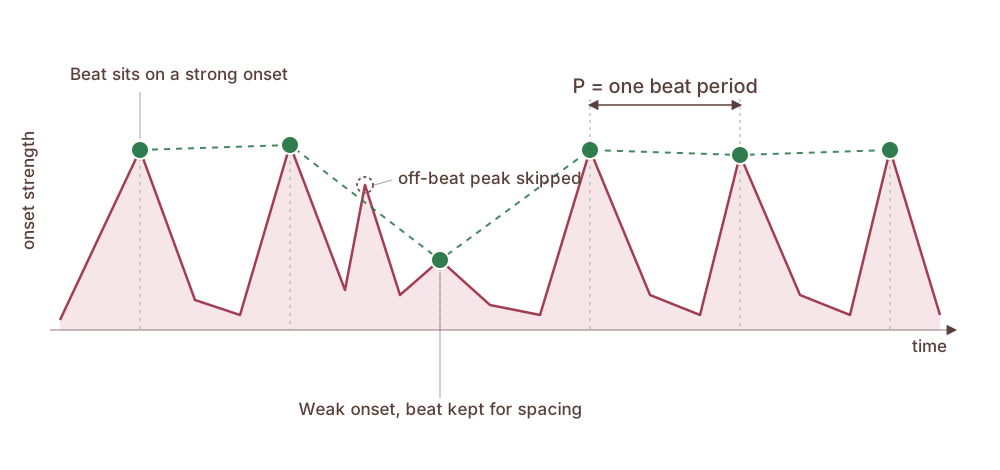
Tempo gives the beat spacing. DP chooses the beat grid offset, skips loud off-beat peaks, and keeps the grid regular when a beat is weak.
Beat tracking with dynamic programming (DP)
Beat tracking uses the estimated BPM to place the actual beat timestamps. Tempo estimation gives BPM, but it does not choose the beat grid offset, that is where those beats start. DP helps choose which grid is most plausible across the whole track. It can keep the sequence regular when one beat is weak or missing, and it can skip a loud off-beat onset.
If the tempo is 120 BPM, the beat interval is about half a second, but many half-second grids could fit the same track. A greedy method can pick a loud off-beat peak and shift the rest of the grid. DP scores the full sequence at once: it rewards strong onset evidence, rewards intervals close to the tempo, and chooses the best global sequence rather than making one local decision at a time.
Ellis 2007 dynamic programming solves that as one sequence-scoring problem over the whole track. The next slide opens that objective so students can see where the regular beat grid comes from.
Beat tracking optimization
DP chooses the beat sequence with the best total score: strong onset peaks plus regular spacing near the estimated BPM.
\[
\hat{b}_{1:m}=\arg\max_{b_{1:m}}
\left[
\sum_t O(b_t)
+ \lambda\sum_{t>1} R(b_t-b_{t-1}, P)
\right]
\]
b_tO(b_t)PR(gap, P)DP job : find the full beat sequence with the highest total score
Beat tracking optimization
This is the simplified objective behind the beat-tracking picture. The algorithm is choosing the whole beat sequence, not one beat at a time. The first term rewards beats that land on strong onset peaks. The second term rewards gaps between beats that are close to the period P implied by the estimated BPM.
The dynamic-programming implementation computes this efficiently by looking backward from each possible beat time to likely previous beat times. It gets a high reward when the gap is close to P, and a lower reward when the gap is early or late. The implementation searches only gaps within about plus or minus 25 percent of P. Solving this forward over the whole onset curve gives the best-scoring beat sequence.
Beat switches
beat salad reports a dominant BPM and an alternate tempo when a secondary tempo covers at least 25% of the track.
Field
What it contains
Example
global_bpmDominant tempo for the whole file
120 BPM
multi_tempoBoolean: another tempo covers at least 25%
true
alternate_bpmSecondary tempo + coverage fraction
90 BPM, 45%
tempo_segmentsTimeline of local BPM ranges
120 BPM, then 90 BPM
Beat switches
beat salad handles a beat switch by comparing local tempo estimates against the dominant global BPM.
global_bpm is the dominant tempo for the whole track.
multi_tempo is true when another tempo covers at least 25 percent of the track.
alternate_bpm reports that secondary tempo and its coverage fraction.
tempo_segments come from rolling-window tempo estimation and list the time ranges where each local BPM applies.
Beat-switch decision rule
Multi-tempo detection reruns tempo estimation in rolling windows and reports a secondary tempo only when it covers enough of the track.
\[
\begin{aligned}
\widehat{b}_w &= \operatorname{tempo}(w) \\
b_r &= \operatorname*{mode}_{w \in r}\,\widehat{b}_w \\
q_r &= \frac{\operatorname{duration}(r)}{\operatorname{duration}(\mathrm{track})}
\end{aligned}
\]
wrb_rDecision rule : report multi_tempo when \(|b_r - b_{\mathrm{global}}| > \delta\) and \(q_r \ge 0.25\)
Beat-switch decision rule
This formula describes the beat-switch detector rather than a new model. beat salad reruns tempo estimation in overlapping windows. Each window receives a local BPM estimate. The detector then walks along the track and groups neighboring windows into a run r when their local BPM estimates agree closely enough to represent the same local tempo. If the next window moves to a different local BPM, the current run ends and a new run starts.
The formula names the local tempo for each window, the representative tempo for a run of similar windows, and the fraction of the track covered by that run. A region becomes the alternate tempo only when it differs enough from the global BPM and covers at least a quarter of the track. That threshold prevents a short noisy section from turning into a multi-tempo result. In the demo, the 90 BPM half passes that coverage rule.
Multi-tempo
Beat-switch demo
A 60-second demo: 120 BPM for the first half, then 90 BPM. The output below is beat salad's result.
120 BPM 0:00-0:30
90 BPM 0:30-1:00
Play track
Reset
0:00 / 1:00
global_bpm 120.08
multi_tempo true
alternate_bpm 90.03
switch detected ~33 s
Beat-switch demo
The track is a 60-second demo built at 120 BPM for the first half and 90 BPM for the second. It is the same file that produced the numbers on the slide.
beat salad recovers both speeds within about a tenth of a BPM.
multi_tempo is true because the second tempo covers 45 percent of the file.
alternate_bpm reports the second tempo at 90 BPM.
tempo_segments lists the detected local tempo ranges. The split lands near 33 seconds against a true 30 because the detector scores 12-second windows every 6 seconds.
The windowed detector needs at least a window plus a hop of audio, about 18 seconds, before it can report a second tempo. Below that it returns a single global tempo.
beat salad pipeline
beat salad turns samples into onset evidence, estimates tempo, places beats, and checks for local tempo changes.
Samples
mono audio values
→
Onset detection
energy rises
→
Tempo estimation
periodicity score
→
Beat tracking
beat timestamps
→
Beat-switch detection
local tempo runs
→
BeatAnalysis
global_bpmbeatsmulti_tempoalternate_bpmtempo_segments
beat salad pipeline
This slide puts the beat salad method back together after the individual method slides. The samples become an onset-strength curve. Tempo estimation picks the main beat period from repeated peaks in that curve. Beat tracking then uses dynamic programming to turn that period into timestamped beats. Beat-switch detection reruns tempo estimation in rolling windows, groups local BPM runs, and reports multi_tempo, alternate_bpm, and tempo_segments when a secondary tempo covers enough of the track.
The output is a BeatAnalysis. global_bpm is the dominant tempo for the whole file. beats are the timestamped beat positions. tempo_segments are detected by rerunning tempo estimation in rolling windows and grouping local BPM ranges when the track has a meaningful tempo change.
Tempo evaluation metrics
Tempo uses Acc1 and Acc2. The next slide reports both on GiantSteps Tempo.
Acc1
Global BPM is correct when it is within 4% of the reference tempo.
Acc2
Also counts half-time and double-time as correct, because they represent the same pulse counted differently.
Tempo evaluation metrics
Define these metrics before the tempo evidence. Accuracy1 counts a BPM estimate as correct when it is within four percent of the reference. Accuracy2 also counts half-time and double-time as correct, because 70 and 140 BPM can describe the same pulse at different metrical levels. The next slide reports only Acc1 and Acc2.
Tempo diagnostic results
On GiantSteps Tempo, beat salad leads the DSP systems on exact-tempo Acc1 and trails stratum-dsp by 0.02 on Acc2, which accepts half-time and double-time matches. Beat This learns beat activations instead of using a fixed spectral-flux onset curve.
System
Class
Acc1
Acc2
beat salad DSP
0.68
0.83
stratum-dsp
DSP
0.60
0.85
Essentia
DSP
0.61
0.80
librosa
DSP
0.37
0.52
Beat This
Learned
0.86 0.94
Tempo diagnostic results
This slide reports the tempo numbers because the metrics slide should lead to evidence, but the evidence boundary has to be explicit. GiantSteps Tempo was used during development, so these numbers are useful for comparing behavior against known systems on the same corpus, but they are not the final generalization claim.
beat salad scores 0.68 Acc1 and 0.83 Acc2. It is the best DSP system on Acc1, while stratum-dsp is the best DSP system on Acc2. Beat This uses a trained model to predict beat activations instead of using a fixed spectral-flux onset curve, and it is higher on both metrics. That is useful diagnostic context, but it is not enough for a paper claim. The next benchmark step is to run the same systems on additional tempo corpora with the same metric code, preprocessing, and failure accounting.
Waveform summarizer
sampler platter
Compact waveform overview
sampler platter
sampler platter bins mono samples into up to 1,500 columns, each summarized by minimum, maximum, and RMS, producing a Serato-compatible column layout for a waveform lane. The output is a WaveformOverview.
This analyzer is simpler than beat and key estimation: it summarizes the signal for display rather than inferring a musical label.
sampler platter
Waveform summarization
Column : one display column contains samples x_1...x_n.
Min : min = min(x_i), the lowest sample.
Max : max = max(x_i), the highest sample.
RMS : RMS = sqrt((x_1^2 + ... + x_n^2) / n), average energy.
Peak : peak = max(|min|, |max|), the largest absolute sample.
Drawn height : r = sqrt(peak * RMS); h is the final bar height after the app rescales r.
Band : b = 1...8 names the frequency band; E_b is energy in band b.
Band scale : p_b = (b - 1) / 7, so p_b runs from 0 for the lowest band to 1 for the highest.
Color : c = sum_b(p_b E_b) / sum_b(E_b), then hue = 10 + 200c.
Waveform summarization
Each display column keeps a small summary rather than the original audio. Start with one display column that contains samples x_1 through x_n. The stored shape values are min = min(x_i) and max = max(x_i). The stored energy value is RMS = sqrt((x_1^2 + ... + x_n^2) / n). The renderer derives peak = max(|min|, |max|), computes r = sqrt(peak times RMS), then rescales r across the segment. The result h is the final drawn height of that bar.
Color is separate. Inside that same display column, b = 1 through 8 names the frequency bands. The analyzer measures E_b, the energy in band b. The value p_b = (b - 1) / 7 is a normalized frequency coordinate: band 1 maps to 0, band 8 maps to 1, and the middle bands fall between those values. The spectral balance is c = sum_b p_b E_b / sum_b E_b. The renderer maps that balance to color with hue = 10 + 200c. The same E_b term is used in both sums, so c is an energy-weighted average of band frequency coordinates.
Key estimator
key lime
Musical key from chroma and a compact reranker
key lime
key lime estimates a major or minor key for the whole track, plus local key segments. The API always returns a tonic and a mode, for example A minor. Camelot, the DJ key notation used for harmonic mixing, is a display spelling only, which an app can add.
The global key is now chosen by a compact reranker that reads the same chroma sequence and DSP key scores that key lime already computes.
Vocabulary
Key vocabulary
These terms define the musical object that key lime predicts.
Pitch class
The note name without octave. One C key and the next C key up are an octave apart, and both are pitch class C.
Chroma
A 12-value summary of how much audio energy belongs to each pitch class: C, C#, D, ... B.
Tonic
The pitch class that feels like home or resolution in a specific song or section.
Mode
A scale type, such as major or minor.
Key
A contextual label for a song or section, written as tonic plus mode.
Global key
The one key label selected for the full track.
Key vocabulary
A pitch class is the note name without octave. One C key and the next C key up are an octave apart, and both are pitch class C. Chroma is a 12-value summary of how much audio energy belongs to each pitch class: C, C#, D, D#, E, F, F#, G, G#, A, A#, and B. Chroma is useful because key templates are also defined over those 12 pitch classes, so key lime can compare the track's chroma against the expected pitch-class pattern for each key.
The tonic is the pitch class that feels like home or resolution in a specific song or section. Mode is a scale type, such as major or minor. A key is a contextual label for a song or section, written as tonic plus mode, for example C major or A minor.
A key label combines a tonic and mode, for example C major or A minor. The global key is the one key label selected for the full track. The next slide explains how wrong labels are scored.
Key estimation as 24-way classification
Chroma measures energy in 12 pitch classes. The classifier predicts which pitch class is the tonic and whether the mode is major or minor.
Relative major/minor
A minor and C major share a key signature, so their chroma can be similar.
Parallel major/minor
A major and A minor share a tonic but differ in mode.
Perfect fifth
A and E are close in tonal function. Keys a fifth apart share many stable notes.
Unrelated key
Outside those relationships. Usually means the tonal center was missed entirely.
Key estimation as 24-way classification
This slide explains the classification problem. Chroma summarizes which note names are present in the audio, independent of octave. key lime uses that pitch-class pattern to choose one global key label. The label set is 12 tonic choices crossed with two modes, major and minor, giving 24 tonic-mode candidates. The later DSP pipeline shows how chroma is compared with templates to produce scores for those labels. The classifier still picks one label, but the wrong labels have different musical meanings.
MIREX weighted score gives partial credit when the predicted label is related to the reference key: 50 for a fifth, 30 for a relative major or minor, 20 for a parallel major or minor, and 0 for an unrelated key.
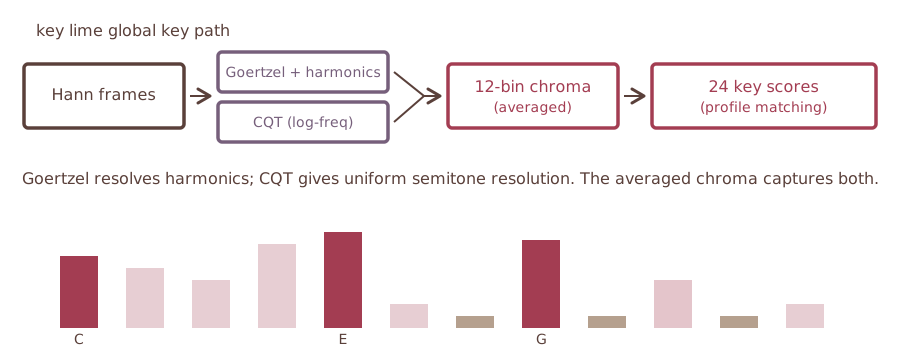
DSP key-estimation pipeline
Outputs by stage: windowed audio frames → pitch-class evidence → averaged 12-bin chroma → 24 key scores → global key with optional local segments.
DSP key-estimation pipeline
The DSP pipeline is the control system for the key estimator. Audio samples are decoded and downmixed once. The first output is windowed audio frames. The Goertzel and CQT branches turn those frames into pitch-class evidence. Averaging produces one 12-bin chroma representation. Profile matching turns that chroma into 24 key scores, one for each tonic-mode candidate. The final output is a global key, with optional local key segments from the DSP analysis.
That pipeline is useful by itself because it is small, deterministic, and inspectable. It is also useful as a learned-model input because the 24 DSP scores are already a compact musical prior. The reranker later uses that prior together with the chroma sequence.
Framing audio for key estimation
key lime analyzes short overlapping slices of audio. A Hann window fades each slice at the edges before frequency analysis.
Frame : a short slice of the audio signalHHann window : fades the frame edges so boundaries contribute less energyOutput : windowed audio frames for Goertzel and CQT pitch analysis
Framing audio for key estimation
The key estimator starts from the same mono PCM as the other analyzers. Instead of analyzing the whole track as one block, it cuts the signal into overlapping frames. A frame is a short slice of audio. H is the hop size, which is the step from the start of one frame to the start of the next frame. Because H is smaller than the frame length N, adjacent frames overlap.
Each frame is multiplied by a Hann window. The window is near zero at the frame edges and high in the middle, so the frequency analysis is driven by the center of the frame rather than by an abrupt cut at the boundary. In formula form, the windowed frame is \(x_m[n] = x[n + mH]w[n]\), where \(w[n] = 0.5 - 0.5\cos(2\pi n/(N-1))\). The output of this stage is a sequence of windowed audio frames. Those frames feed both pitch-evidence branches on the next slide.
Measuring pitch energy in each frame
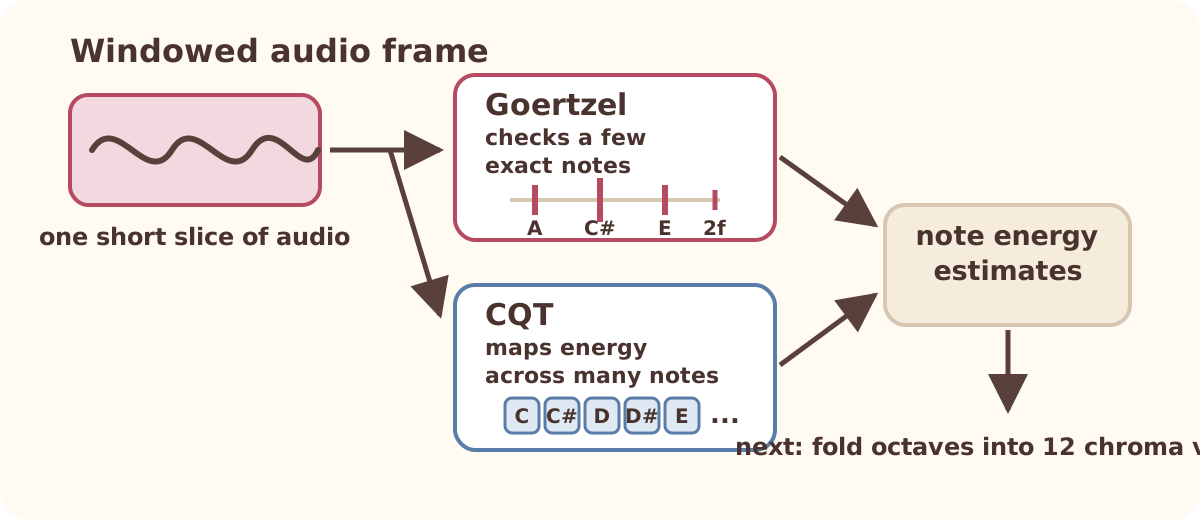
Goal: turn each windowed audio frame into note-energy estimates. The next step folds those estimates into 12 chroma values.
Goertzel : ask a few chosen questions, such as "how much A is in this frame?"CQT : build a broader note-spaced energy map across the pitch rangeOutput : note energy estimates for the next chroma-folding step
Measuring pitch energy in each frame
This slide explains the pitch-evidence stage in the pipeline diagram. At this point, key lime has a short Hann-windowed audio frame. The question is simple: which musical frequencies are strong in this frame?
Goertzel and CQT both measure pitch energy, but they answer different versions of the question. Goertzel is targeted. It asks a few chosen questions about the frame: how much energy is near A, how much is near C#, and how much is near their harmonics? CQT is broader. It builds a keyboard-shaped spectrum across many note-spaced bins, so the output lines up with musical pitch names rather than equal hertz steps.
Both branches produce note energy estimates per frame. The next slide shows the next operation: fold octave-related frequencies into 12 pitch classes to make chroma.
Output: 12-value chroma
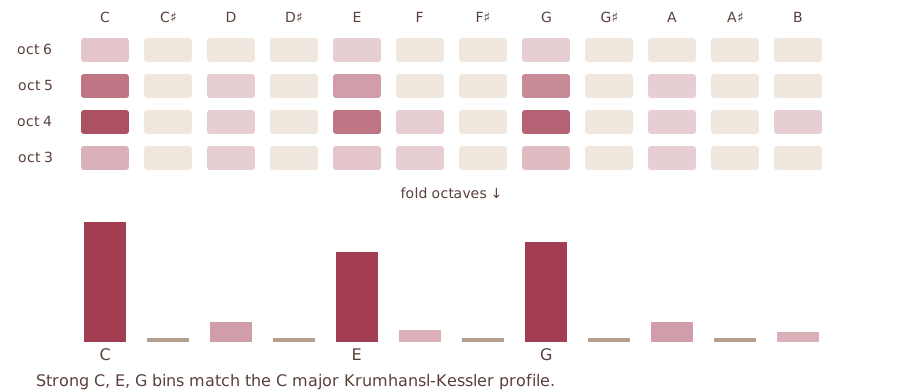
This is the step where the pipeline first creates chroma: 12 values, one for each pitch class.
Input : pitch-frequency energy from Goertzel and CQTFold octaves : C2, C3, and C4 all add to the C pitch-class binOutput : 12 chroma values, one for each pitch classNext step : compare the chroma pattern with 24 key templates
Output: 12-value chroma
This slide connects the pitch-energy slide to the template-scoring slide. The input is pitch-frequency energy from Goertzel and CQT. The operation is octave folding: frequencies that are different octaves of the same note name add to the same pitch-class bin. For example, C2, C3, and C4 all support pitch class C. The output is a 12-value chroma vector, one value for each pitch class.
The important tradeoff is that chroma discards octave and voicing information. That is useful for key estimation because keys are defined by pitch classes, but it also means that related keys can look similar. The next slide compares the chroma pattern with 24 key templates, one for each tonic-mode label. The reranker later reads the frame-level chroma sequence to help resolve related-key confusions.
Key templates and scoring
A key template is a 12-value chroma pattern for one key. Compare the song chroma with 24 templates and pick the highest score.
cT_kcorrSelection : the highest of 24 template scores becomes the predicted key
Key templates and scoring
The 12-note chroma is the input to key scoring. Think of each key template as a 12-number fingerprint for what that key usually emphasizes. C major, for example, expects more support around pitch classes such as C, E, and G than around unrelated pitch classes. A minor has a different expected pattern.
key lime compares the song chroma \(c\) with every candidate template \(T_k\). There are 24 candidates because there are 12 possible tonic pitch classes and 2 modes, major and minor. The score is Pearson correlation after mean-centering and normalizing both vectors. In full form, \(\operatorname{score}(k)\) is the sum over pitch classes of \((c_p-\bar{c})(T_{p,k}-\bar{T}_k)\), divided by the product of their vector lengths. The highest of the 24 scores becomes the global key estimate.
Krumhansl-Kessler is one profile family. It comes from listener judgments about how stable each pitch class sounds inside a major or minor key, so it gives a 12-value expected pattern for a key. The shipped DSP scorer averages Krumhansl-Kessler, Temperley, EDMA, and a corpus-learned profile. The learned profile was generated by the trail mix profile-training script from GiantSteps Key benchmark output, which the repo marks as a development corpus and keeps separate from the sealed FMAKv2 holdout. That is not neural-model training, but it is supervised template calibration, so it belongs on the development side of the boundary. This matters because the reranker consumes these 24 DSP scores as input, so template provenance affects both KL-DSP and KL-FMAK. It also includes refinements for tuning, relative-key disambiguation, and confidence-gated segmentation.
Multi-key
A key change
A 60-second demo: A major for the first half, then C minor. This is key lime's DSP-only local segmentation; the reranker selects only the global key.
A major 0:00-0:30
C minor 0:30-1:00
Play sample
Reset
0:00 / 1:00
key C minor
multi_key true
alternate_key A major
change detected ~33 s
A key change
The track is a 60-second synthetic demo built from two chord sections: A major for the first half and C minor for the second. This demo is DSP-only local segmentation. The compact transformer reranker selects the global key; it does not yet rerank local key segments. For this demo, the local analysis windows are shorter than the production default so a simple chord change produces visible segments.
key lime reports multi_key as true. The stable detected sections are A major at the start and C minor after the change. The primary key is C minor because the local segmentation assigns it the longest stable span in this synthetic example. A short transition window appears around the boundary because the rolling analysis windows overlap both chord sections.
Key evaluation metric
For each track, MIREX gives credit based on how close the predicted key is to the reference key, then averages those credits from 0 to 100.
Prediction relation
Example if reference is C major
Credit
Exact C major
100
Perfect fifth G major or F major
50
Relative major/minor A minor
30
Parallel major/minor C minor
20
Unrelated Any other key
0
\[s_i=\text{credit for track }i\text{ from the table},\qquad \text{MIREX}=\frac{s_1+s_2+\cdots+s_N}{N}\]
Key evaluation metric
Define the key metric before showing the results table. MIREX is a standard key-estimation scoring rule used in music information retrieval evaluations. For each track, compare the predicted key with the reference key. The score is not only correct or wrong. A musically related wrong key gets partial credit.
Using C major as the reference, C major receives 100. A fifth-related prediction such as G major or F major receives 50. The relative minor, A minor, receives 30. The parallel minor, C minor, receives 20. Any unrelated key receives zero. In the formula, s_i is the credit assigned to track i from this table. The dataset score is the average of those per-track credits, so it remains on a 0 to 100 scale. This deck uses MIREX as the primary key metric because it is the published comparison metric for FMAKv2 and because it distinguishes close key confusions from unrelated errors.
Reranker data splits
KL means key lime. FMAK means FMA Key, a key-labeled Free Music Archive benchmark; FMAKv2 is the version-2 evaluation set.
Set
Tracks
Used for
Not used for
Training 4,040 FMAK
Update reranker weights
Final reported score
Validation 449 FMAK
Choose the saved model version and when to stop training
Weight updates or final score
Sealed holdout 1,000 FMAKv2
Report KL-DSP, KL-FMAK, and local madmom Training or checkpoint selection
Published full FMAKv2 5,489 FMAKv2 full dataset
Cite MIREX scores from earlier papers
Reranker training, validation, or same-holdout comparison
Reranker data splits
Keep the evaluation boundary separate from the metric definition. KL-DSP is key lime's DSP-only scorer. KL-FMAK is key lime with the compact reranker trained on FMAK labels. FMAK means FMA Key, a key-labeled Free Music Archive benchmark. FMAKv2 is the version-2 evaluation set used for the sealed holdout and published full-set references.
The paper uses 4,040 labeled FMAK tracks for training. These tracks update the reranker weights. It uses 449 disjoint FMAK tracks for validation. Validation chooses which saved model version to keep and when to stop training, but it does not update weights and it is not the final reported score.
The reported local result comes from a sealed 1,000-track FMAKv2 holdout evaluated once for the final result. That holdout reports KL-DSP, KL-FMAK, and local madmom on the same files. The manifest checks track IDs across train, validation, and holdout sets and reports zero overlap, so the learned reranker is evaluated on tracks that were not used for fitting or model selection.
The published full FMAKv2 row is not one of our reranker splits. Those numbers come from earlier papers that report full-set FMAKv2 MIREX scores over all 5,489 tracks. They provide context, but they are not same-manifest local comparisons against the 1,000-track sealed holdout.
Key focus
Why add a reranker?
On the 1,000-track FMAKv2 holdout, the DSP key baseline scores 61.08 MIREX. Local madmom scores 74.16 MIREX on the same files.
Key baseline
Value
KL-DSP MIREX 61.08
Local madmom MIREX 74.16
MIREX gap to local madmom 13.08 points
Available evidence 24 DSP scores + chroma frames
Why add a reranker?
trail mix is not only a key estimator. It also emits tempo, beat positions, local tempo sections, and waveform summaries. beat salad and sampler platter now have enough product coverage to discuss, while key estimation has the clearest measured reason for deeper modeling.
The pure DSP key scorer is compact and interpretable, but it scores 61.08 MIREX on the sealed 1,000-track FMAKv2 holdout. Local madmom scores 74.16 MIREX on the same files, a 13.08-point gap. key lime already has two inputs that can support a learned correction: frame-level chroma and the 24-dimensional DSP score vector. That motivates a compact reranker rather than a replacement model.
DSP-guided transformer reranker
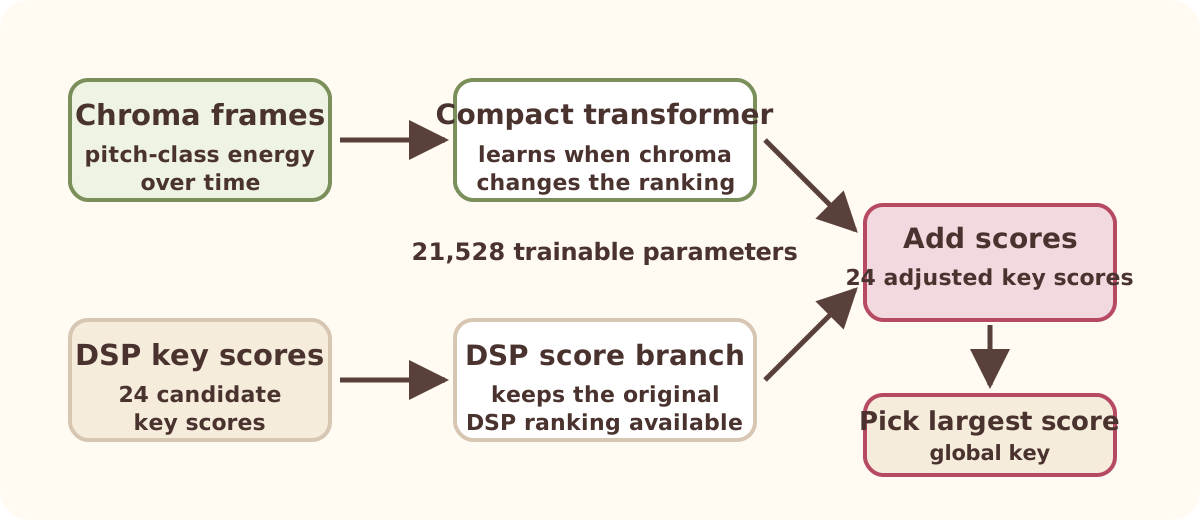
Reranking means the DSP scorer proposes 24 key scores, then the learned model adjusts those scores using chroma-frame context.
1. DSP ranks candidates : produce 24 scores, one for each tonic-mode label2. Chroma gives context : show how pitch-class energy changes across the first 256 frames3. Learned model adjusts scores : add a learned correction to the DSP ranking4. Highest adjusted score wins : choose the global key; local key segments remain DSP-based
DSP-guided transformer reranker
The reranker is deliberately small. key lime still extracts chroma, scores all 24 major and minor keys with DSP, and computes local key segments the same way as before. The learned part only reranks the global-key candidates.
Reranking means this: the DSP stage produces an initial score for each of the 24 key labels. The transformer reads the frame-level chroma sequence and learns a correction to those 24 scores. The corrected scores keep the same 24 tonic-plus-mode layout, and the highest corrected score becomes the selected global key. The local key segments remain DSP-based.
The selected model has 21,528 parameters. In the arXiv paper, the evaluated artifact is a 115 KB ONNX model, and the footprint table includes ONNX Runtime. In the Rust release, those same weights are embedded and the forward pass is written in Rust, so Cueport does not need ONNX Runtime, PyTorch, or a separate model service. Tests compare the Rust logits against ONNX reference fixtures with absolute error below 1.0e-4, so the packaged forward pass remains tied to the validated model.
Reranker architecture and parameter budget
The chroma branch makes 24 learned score corrections. The DSP branch carries the 24 DSP scores. Add them, then choose the largest score.
Reranker architecture and parameter budget
The architecture figure shows how the model uses two branches. The left branch reads frame-level chroma and turns the chroma sequence into 24 learned score corrections. The right branch carries the 24 DSP key scores through a learned 24-by-24 projection. That projection starts as the identity, meaning it initially copies the DSP ranking rather than changing it.
The outputs are summed as logits over the same 24 key classes. Logits are unnormalized key scores. This is the concrete implementation of the residual reranking idea: start with the DSP ranking, add learned corrections from chroma context, then select the largest adjusted score. The parameter budget is deliberately small. The whole model has 21,528 trainable parameters.
How the reranker is trained
Training teaches the reranker when chroma context should change the DSP ranking.
Step
What happens
1. Read inputs first 256 chroma frames (about 32 s) plus 24 DSP scores
2. Learn the answer predict the FMAKv2 key label; related keys get small partial credit
3. Update weights AdamW updates model weights; validation decides when to stop
4. Test variants transpose examples, try easy-to-hard ordering, and test teacher distillation
How the reranker is trained
This slide tells the training story rather than listing every hyperparameter. The reranker reads two inputs: the first 256 chroma frames, which covers about 32 seconds, and the 24 DSP key scores. It learns to predict the FMAKv2 key label from those inputs.
The target is MIREX-aware rather than one-hot only. The true key receives most of the mass, while a small amount is spread over musically related fifth, relative, and parallel neighbours. AdamW updates the model weights with learning rate 0.001, batch size 16, at most 25 epochs, class balancing, dropout 0.3, weight decay 0.05, and validation-based early stopping.
The tested variants are there to check which training choices matter. Transposition augmentation rotates each input sequence and label through all 12 semitones. The DSP-margin curriculum starts with tracks where the top DSP score is clearly separated from the runner-up, then adds harder tracks over five epochs. Ordering can affect a neural model because training updates weights step by step. Early examples shape the solution that later examples refine.
Teacher distillation means that another model supplies a soft target, not just a single hard label. For each track, the frozen madmom KeyCNN teacher produces probabilities over the same 24 key labels. The optional distilled reranker is trained partly to match the FMAKv2 label and partly to match those teacher probabilities. The α = 0.3 setting gives the teacher term 30 percent of the target weight, and temperature T = 4 smooths the teacher probabilities so near-miss labels carry more information. The final reported model is the label-trained version, because the distilled comparison did not improve MIREX.
FMAKv2 key-estimation results
Only compare rows with the same run type. The sealed-holdout rows are fair comparisons; published full-FMAKv2 rows are context, not win/loss claims.
System
Run type
Tracks
MIREX score
KL-DSP local sealed holdout
1,000
61.08
KL-FMAK local sealed holdout
1,000
73.55 ± 0.46
madmom (local run) local sealed holdout
1,000
74.16
S-KEY 60k published full FMAKv2
5,489
72.10
S-KEY 1M published full FMAKv2
5,489
73.20
madmom (published) published full FMAKv2
5,489
73.10
FMAKv2 key-estimation results
The fair comparison is the local sealed-holdout group. KL-DSP, KL-FMAK, and local madmom are all run on the same sealed 1,000-track holdout. Do not say KL-FMAK beats S-KEY from this table. The S-KEY rows are full-FMAKv2 results from earlier papers over 5,489 tracks. They provide context, but they are not same-manifest comparisons against the local rows because S-KEY was not rerun on this holdout in the paper.
On the sealed holdout, KL-DSP reaches 61.08 MIREX. Across three seeds, KL-FMAK raises that to 73.55 plus or minus 0.46 MIREX. That is a 12.47-point gain. Three seeds are enough for a descriptive mean and standard deviation, but the interval should not be read as a complete uncertainty analysis.
The same-manifest local madmom KeyCNN reference scores 74.16 MIREX. The KL-FMAK mean is 0.61 MIREX points below local madmom, so this holdout shows them as very close rather than clearly separated. madmom is a same-manifest inference comparison here, but its original training data may overlap with FMA audio. That means the near-tie should be read as context, not as a claim that the two training protocols are equally isolated. Earlier local S-KEY experiments are not presented as paper results here; this deck follows the paper table and uses published S-KEY rows only as full-dataset context.
Which input features help?
This asks whether the gain comes from reranking alone or from giving the reranker chroma-frame evidence.
Takeaway: DSP-score-only reranking does not help. DSP plus chroma-frame reranking produces the MIREX gain.
Variant
Parameters
MIREX score
KL-DSP baseline 0 learned
61.08
Only 24 DSP key scores (no chroma frames) 576
60.25 ± 0.45
DSP-score + chroma-frame features 21,528
73.55 ± 0.46
DSP-score + chroma-frame features + teacher distillation 21,528
72.50 ± 0.58
No DSP-margin curriculum 21,528
73.16 ± 0.62
Linear chroma input projection 21,984
72.50 ± 0.47
Which input features help?
This comparison is important because it explains why the reranker works. In machine-learning terms this is an ablation study: remove or replace one feature group and see how the metric changes. The only-24-DSP-key-scores row is still a reranker, but it only learns how to reweight the 24 DSP scores. It does not read the chroma-frame sequence. It scores 60.25 MIREX, below the 61.08 KL-DSP baseline, so reranking the DSP scores by themselves is not enough. The improvement appears when the reranker also reads frame-level chroma, which gives it time-local pitch evidence beyond the final DSP ranking.
The final DSP scores plus chroma frames model scores 73.55 MIREX, while the teacher-distilled variant scores 72.50. The paper reports label-trained minus teacher-distilled as +1.05 MIREX with a 95 percent confidence interval of -0.43 to +2.51, so teacher distillation is optional rather than required for the reported gain. The DSP-margin curriculum is an easy-to-hard training order based on how separated the top DSP key scores are. Removing it gives 73.16 plus or minus 0.62 MIREX, close to the final model.
The circular input stage uses 12 trainable weights, compared with 468 for a plain linear projection over chroma inputs. The linear-projection comparison remains in the same accuracy range, so the circular stage is kept because it encodes pitch-class rotation structure at much lower input-stage parameter cost.
New model footprint
This table breaks installed size into analyzer code, model weights, and runtime so the total shows what an app ships.
System
Analyzer/lib (MB)
Model (MB)
Runtime (MB)
Total installed (MB)
KL-DSP (baseline) 2.0
0
0
2.0
KL-FMAK (+ ONNX) 2.0
0.115
74.6
76.7
KL-FMAK (native) 2.0
0.115
0
2.1
stratum-dsp 1.4
0
0
1.4
libKeyFinder 0.8
0
0
0.8
Essentia EDMM 48.4
0
0
48.4
madmom KeyCNN 0
2.5
171
174
S-KEY 0
0.75
435
436
New model footprint
The simplest way to say the footprint result is: same trained weights, two packages. The paper package is ONNX because that makes the learned model easy to measure and compare with other learned systems. That ONNX package includes 74.6 MB of ONNX Runtime, giving 76.7 MB total. The Cueport package is native Rust. It embeds the same 0.115 MB weights, runs the forward pass in Rust, and does not include ONNX Runtime, giving about 2.1 MB total with the native analyzer.
The total installed column is a runtime-inclusive packaging measurement. Read it as analyzer or library code plus model weights plus inference runtime, rounded to one decimal place where needed. For KL-DSP, the 2.0 MB is the native Rust analyzer package. For native KL-FMAK, the same analyzer package embeds the 0.115 MB weights and does not add a separate inference runtime. For the ONNX package, the runtime column is ONNX Runtime. For libKeyFinder, there is no learned model and no model runtime; its 0.8 MB appears under analyzer/library because it is the compiled native DSP library.
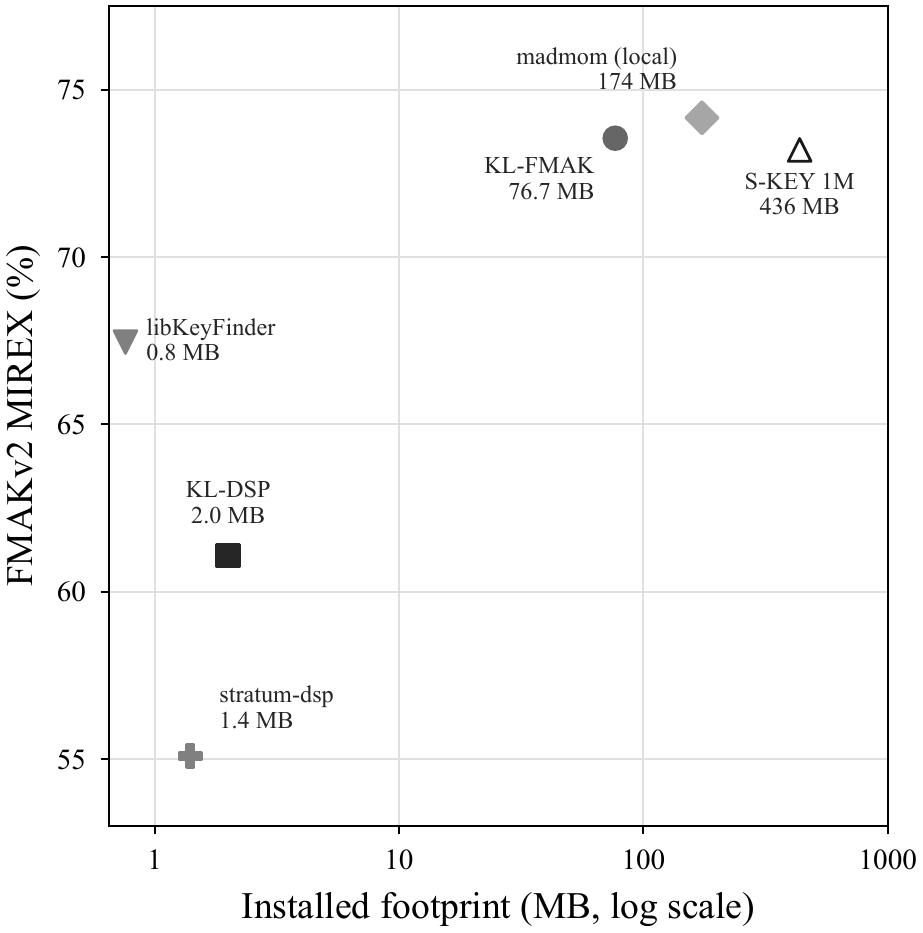
Under the paper measurement, KL-FMAK is 2.3 times smaller than madmom KeyCNN at 174 MB and 5.7 times smaller than S-KEY at 436 MB. The compact DSP analyzers (stratum-dsp, libKeyFinder) are smaller, but their key accuracy is also lower, as shown on the next accuracy-footprint figure.
Accuracy versus installed footprint
The paper footprint figure uses the ONNX package measurement; the Cueport release uses the same weights in native Rust.
Accuracy versus installed footprint
The figure plots installed footprint in megabytes on a log scale against FMAKv2 MIREX score. KL-DSP is compact but less accurate. KL-FMAK moves close to local madmom's MIREX score while using a smaller installed footprint in the paper's ONNX package measurement. S-KEY is included as a published full-protocol reference with a locally measured footprint, so it is useful context but not a same-manifest comparison.
The point of this slide is not that one system is universally better than another. It shows the engineering tradeoff that motivated key lime: keep the local DSP analyzer, add a very small learned key stage, and get much of the accuracy improvement without requiring a large model package for the app use case.
Key runtime measurements
KL-FMAK uses the same full DSP analysis as KL-DSP, then adds a sub-millisecond reranker pass.
System
Time
Corpus
KL-DSP 486 ms
FMAKv2
KL-FMAK 486 ms + 0.32 ms
FMAKv2
stratum-dsp 684.5 ms
FMAKv2
Essentia EDMM 407.1 ms GiantSteps Key
libKeyFinder 591.6 ms
GiantSteps Key
S-KEY 884.9 ms
GiantSteps Key
madmom KeyCNN 2842.7 ms
GiantSteps Key
Key runtime measurements
This slide is speed evidence, not a sealed accuracy comparison. KL-DSP and stratum-dsp were timed on FMAKv2 tracks. Essentia EDMM, libKeyFinder, S-KEY, and madmom were timed on GiantSteps Key. The full-analysis timings include decode, so they answer how long the analyzer took from an audio file in that harness.
KL-FMAK reuses the KL-DSP feature pipeline, so the table shows the 486 ms full-analysis timing plus the measured 0.32 ms warm reranker forward pass after chroma frames and the 24 DSP key scores already exist.
What's next
trail mix next steps
Next work should cover beat analysis, stronger key benchmarks, stronger beat benchmarks, and compact model experiments.
1
Beat analysis
Improve beat positions, tempo-change boundaries, and grid stability
2
Key benchmarks
Add disjoint key datasets and rerun baselines when artifacts are available
3
Beat benchmarks
Evaluate beat tracking and beat grids beyond global-BPM metrics
4
Model experiments
Try small learned components for confidence, local key, and beat uncertainty
trail mix next steps
The next work should not be only key-reranker polish. beat salad still needs algorithm work and stronger validation beyond global-tempo diagnostics: beat positions, tempo-change boundaries, and grid stability need the same level of evidence as the key results.
The benchmark work has two separate tracks. For key, add disjoint datasets and rerun baselines when the artifacts are available. For beat analysis, move beyond global-BPM diagnostics into beat tracking and grid metrics. The model work should remain small enough to explain to students: compact learned components for confidence, local key changes, or beat uncertainty rather than a large replacement model.
Cueport
Cueport next steps
Follow Cueport development at usecueport.com .
1
Cueport Direct libraries
Choose local music folders, scan files, and keep a working library without a DJ database
2
Local analysis
Key, tempo, beat positions, waveform overviews, confidence, and analyzer provenance
3
Desktop and iPhone workflow
Cache selected tracks, review metadata, edit on mobile, and sync changes back
4
Podcast and conversations
Talk with DJs, engineers, and music analysis experts about music ownership, metadata, analysis, mobile prep, and open tools
Cueport next steps
The product ask is separate from the research roadmap. Cueport Direct is for people who own music and want local tools for organizing, preparing, and reviewing it. The next Cueport work is to make direct libraries feel complete: choose folders, scan tracks, generate analysis, store confidence and provenance, and support desktop and iPhone workflows.
The community ask is part of Cueport's product work. Cueport should build an audience by speaking with DJs, engineers, and music analysis experts. A podcast is one way to make those conversations useful beyond a single demo or release note: music ownership, DJ and listener workflows, metadata, analysis quality, mobile preparation, open tooling, and how Cueport should present confidence, provenance, and review.
Selected bibliography
A short reference map for the methods, learned key baselines, tempo baselines, and datasets used in the talk.
Reranker and baselines
Noorzad. Key lime: a 115 KB DSP-guided transformer for key estimation. arXiv preprint, 2026.
Vaswani et al. Attention is all you need . NeurIPS, 2017.
Kong et al. S-KEY . ICASSP, 2025.
Selected bibliography
These are the references most likely to matter for the talk. The key column covers the template-scoring lineage and the madmom KeyCNN baseline. The reranker column covers the key lime paper, transformers, and S-KEY as the main learned key reference. The tempo-method column covers onset detection, dynamic-programming beat tracking, the learned Beat This baseline, and the datasets shown in the deck.
IEEE Lunch & Learn
Thank you
Thank you
Thank you.
Presenter Q&A prep:
DSP template provenance. The shipped KL-DSP scorer averages four profile families: Krumhansl-Kessler, Temperley, EDMA, and a corpus-learned profile. The learned profile comes from GiantSteps Key benchmark output via benchmarks/train_key_profiles.py; GiantSteps Key is a development corpus in benchmarks/corpus-policy.json, not the sealed FMAKv2 holdout. Using all of GiantSteps is acceptable only under that development/evaluation split: it can inform template design and calibration, but it cannot be reported as an independent test set. Since KL-FMAK consumes the DSP scores, this provenance matters for both KL-DSP and KL-FMAK.
Tempo diagnostic boundary. The GiantSteps Tempo table is a same-corpus development diagnostic, not the final beat salad benchmark. If asked why it is still shown, say that the talk defines Acc1 and Acc2, so it should show the current evidence, but the slide names the limitation and the next step: more corpora, same metric code, same preprocessing, and explicit failure accounting.
madmom training data. The local madmom row is same-manifest inference on the 1,000 FMAKv2 holdout tracks. Its original training data is external and may overlap FMA audio, so the comparison is useful context but not a perfectly isolated training-protocol comparison.
Which 32 seconds. The Rust reranker reads the first 256 chroma frames, about 32 seconds at roughly 8 Hz. Shorter inputs are zero-padded and longer inputs are truncated. It is not a random crop at inference. That is a reproducible fixed window; the DSP score vector still summarizes the full track, and smarter window selection is future work.
Only three seeds. Say that three seeds support a descriptive mean and standard deviation, but a broader seed sweep would give a better estimate of training variability.
One holdout corpus. The FMAKv2 holdout is sealed and useful, but broader key generalization remains future work. That is why the next-work slide lists additional same-manifest corpora.
Rust versus ONNX validation. The Rust forward pass is checked against ONNX reference fixtures with absolute logit error below 1.0e-4. I do not currently have a same-manifest 1,000-track argmax-equivalence report, so do not claim that on stage.